PDF Stacker
Free · Manual InstallMerge job PDFs into one tidy file for the client. Installed directly via Over Geek — not on the ServiceM8 Add-on Store, free to use and will stay that way.
Quickly select, reorder, and combine multiple PDF attachments on a job into a single document. No more juggling separate files — just pick your PDFs, arrange them in the order you need, and export one clean merged file straight back to the job card.
See It in Action
A quick walkthrough showing how PDF Stacker pulls every PDF from a ServiceM8 job, lets you reorder them, and merges them into a single tidy file saved straight back to the job.
- Opens from any job's Add-ons menu
- Pick the PDFs you want to merge
- Reorder by drag before merging
- Result saved straight back to the job
Select the PDFs to Merge
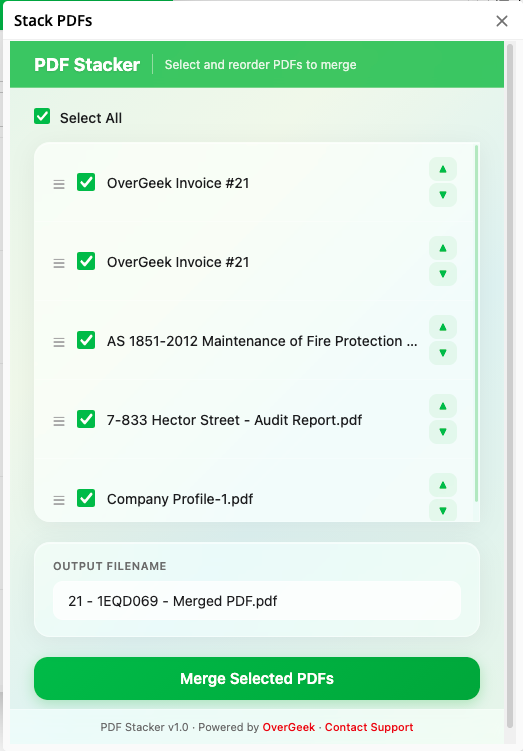
Open PDF Stacker from a job's Add-ons menu and tick the PDFs you want to combine. The list shows every PDF attached to the job, with size and upload date.
- All PDFs attached to the current job
- Tick the ones you want
- Reorder by drag if you need a specific order
One Clean Merged File
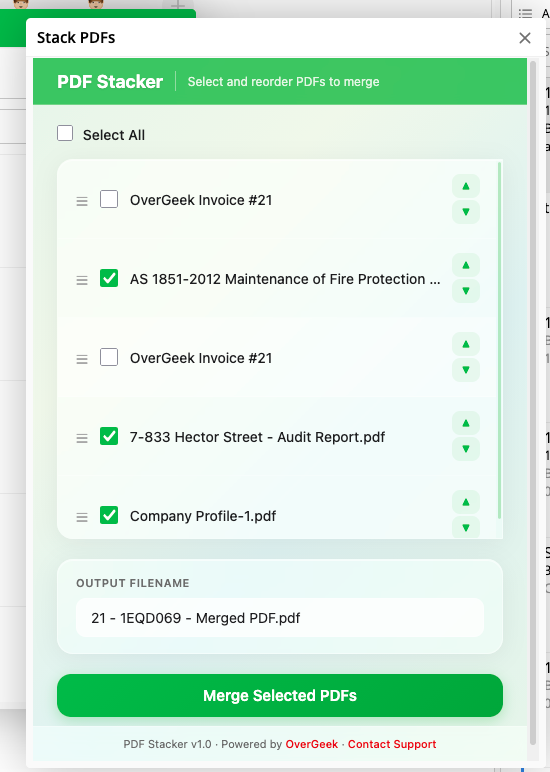
PDF Stacker combines your selected PDFs into a single tidy file ready to send to your client. The result is saved straight back to the job as a new attachment.
- One clean .pdf output
- Saved straight back to the job
- Original PDFs untouched
- Great for invoices + attachments + signed forms in one pack
Opens from Any Job Card
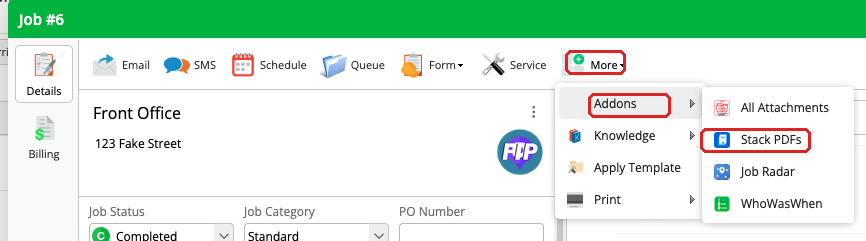
Find it under More → Add-ons → PDF Stacker on any job. No separate app, no extra setup.
- Opens as a modal on the job card
- Works on desktop and the ServiceM8 mobile app
- Free to use, and it’ll stay that way