
DutyPoint
$19.99 AUD/month · Free trialFire hydrant, sprinkler valve, pump and combined-system flow testing turned into a five-minute job — from readings to branded PDF report, without leaving ServiceM8.
Open DutyPoint straight from the job card and the site, client and job details are already filled in. Drop a pin on the exact hydrant or booster location on satellite imagery, take photos (saved to the job diary automatically), and enter your readings at Static, 5/10/15/20 L/s or the pump duty percentages. DutyPoint draws the pressure-vs-flow curve against the duty point, marks the test PASS or FAIL automatically, and attaches a professional PDF report — curve graph, results table, location map, photos and sign-off — straight back to the job.
Readings in, pressure–flow curve drawn live, PASS called and the branded PDF built — without leaving ServiceM8.
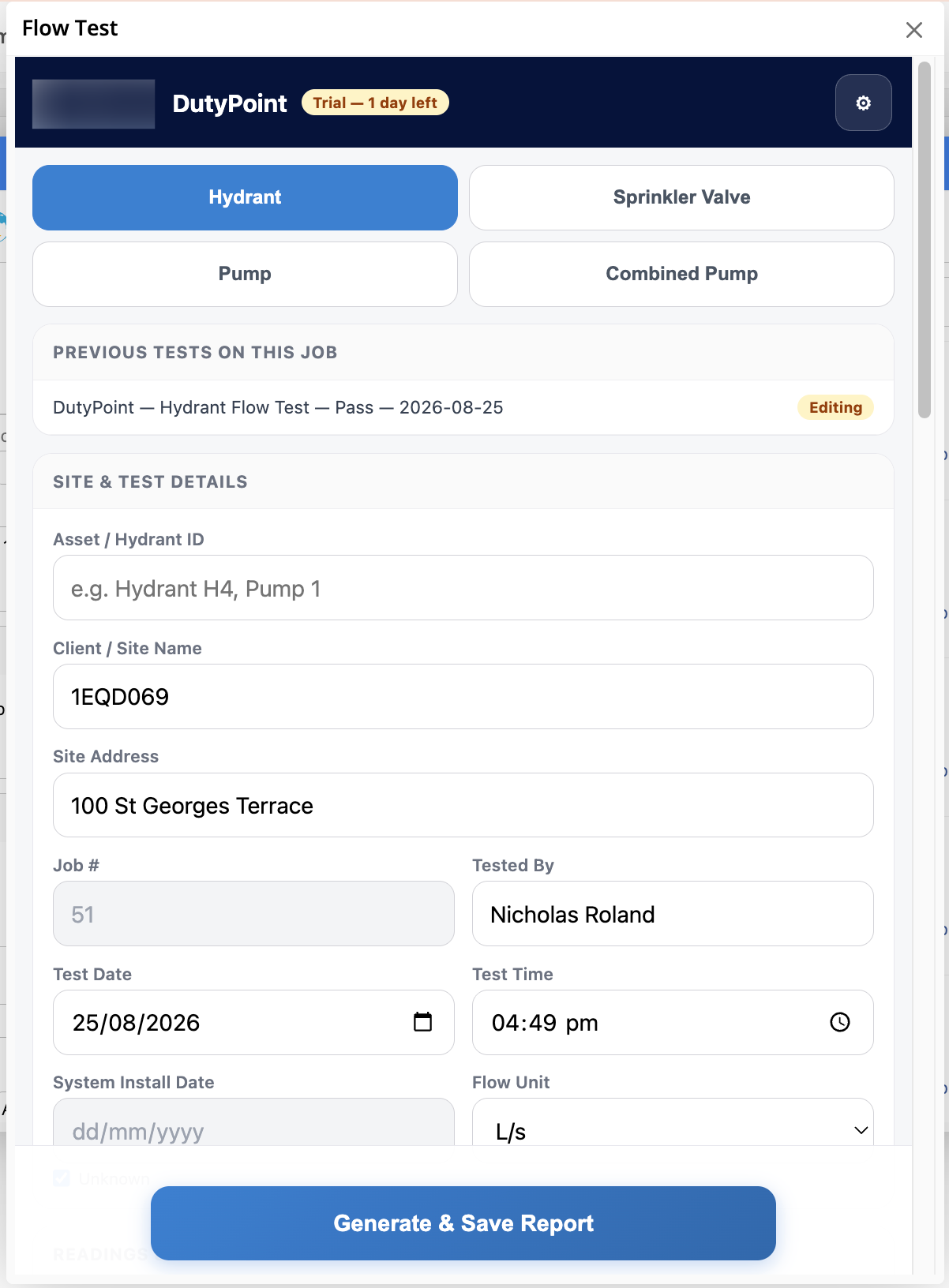
Opens Right from the Job Card
Open DutyPoint from any ServiceM8 job and the site, client, job number, address and technician are already filled in. Pick the test type — Hydrant, Sprinkler Valve, Pump or Combined Pump — enter your Asset / Hydrant ID, set the date, and you’re into the readings.
- Four test modes: Hydrant, Sprinkler Valve, Pump, Combined Pump
- Client / site name, address, job number and tester pulled from the ServiceM8 job automatically
- Test date and time default to now — edit if you’re logging an earlier test
- Previous tests on the same job are listed at the top for one-click recall and edit
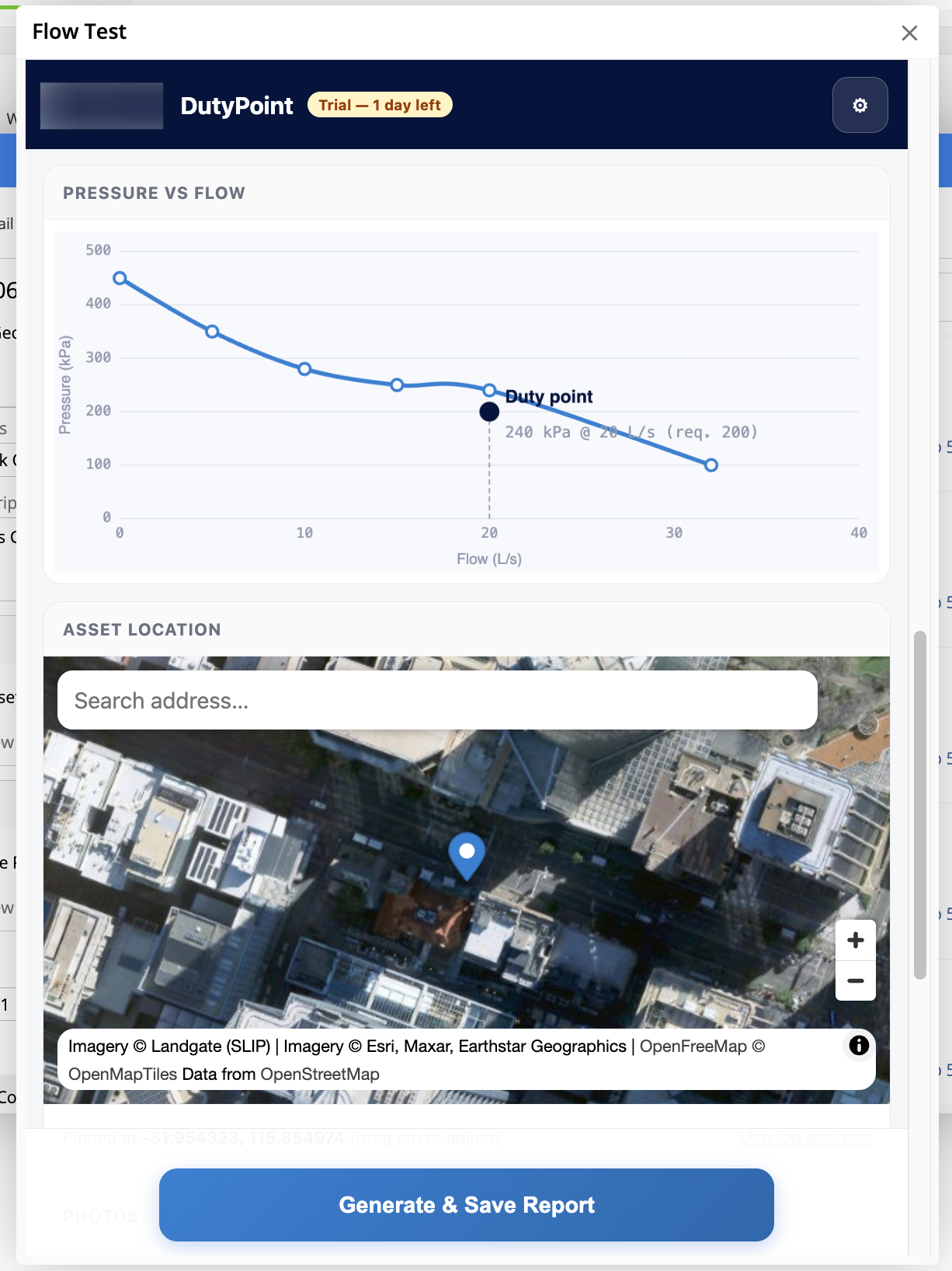
Live Curve & Satellite Pin
As you enter readings at Static, 5, 10, 15 and 20 L/s (or pump duty percentages), DutyPoint draws the pressure-vs-flow curve live. Set the system’s duty point and it’s marked on the curve with the delivered kPa @ L/s callout. Drop a pin on the exact hydrant or booster on satellite imagery so the report shows precisely where the test was run.
- Pressure × Flow curve rendered live as readings are entered
- Duty point marked with delivered pressure vs required minimum
- Satellite drop-pin for the asset — drag to fine-tune, or search an address
- Pin coordinates included on the report so the location is unambiguous
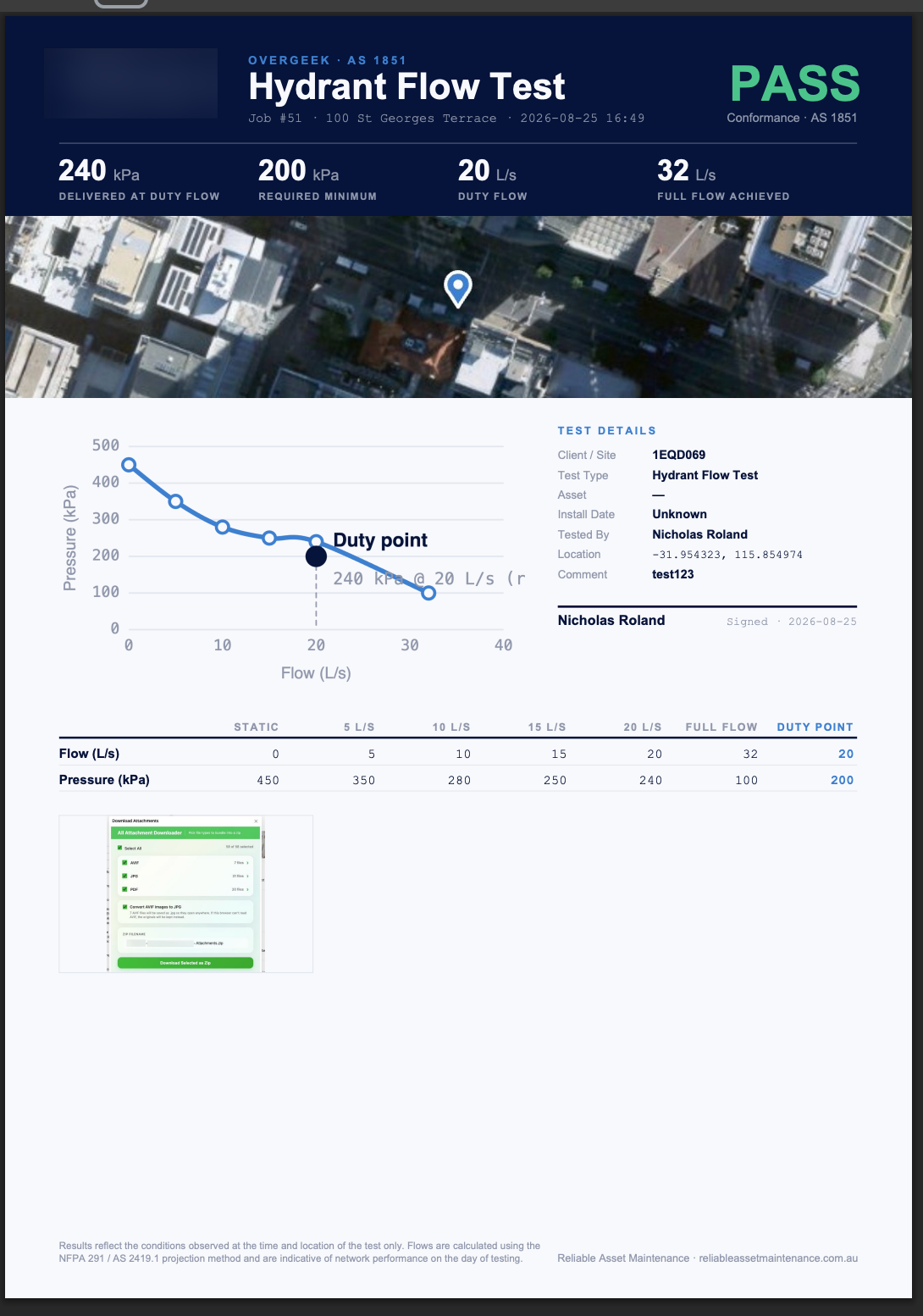
Branded PDF Report, Attached to the Job
Hit Generate & Save Report and DutyPoint builds a professional PDF — headline stats (delivered kPa @ duty flow, required minimum, full-flow achieved), satellite map, curve graph, test details, results table and photos — then attaches it straight to the job’s files in ServiceM8. Sign-off, disclaimer and PASS/FAIL are all in place.
- PASS / FAIL determined automatically from your duty point vs delivered pressure
- Headline stats, results table (Static / 5 / 10 / 15 / 20 L/s / Full Flow / Duty Point) and pressure–flow curve
- Satellite map with the exact asset pin, plus every photo you captured
- PDF attached to the ServiceM8 job diary automatically — ready to email the client
- Photos in the report are clickable through to the full-resolution image
Every Test Saved, Recallable, Editable
Every test you run is saved on the job in ServiceM8. Open DutyPoint again on the same job and previous tests are listed at the top — open one, edit it, regenerate the report. No re-keying, no lost history.
- Full test history per job, one tap to recall
- Edit readings, pin location, photos or duty point at any time
- Regenerate the PDF with the updated data — the new one attaches back to the job
- The original test remains findable in the job diary alongside the report
Your Branding on the Report — $199 One-Off
Reports use our clean default design out of the box. Want them in your company’s branding? We’ll set up a custom template — your colours and logo across the PDF report and the in-app form — for a one-off $199 AUD. Just reach out to our support team with your logo and colour palette.
- Custom colours (primary, accent, header, table, PASS/FAIL) applied to every report you generate
- Your logo across the PDF header and the DutyPoint in-app form
- Custom footer text, disclaimer and default filename pattern
- One-off $199 AUD setup fee — no ongoing charge for the branding
- Get in touch: [email protected]
Free Trial, Then $19.99/mo
Install DutyPoint and start a free trial — no credit card required up front. After the trial the subscription is $19.99 AUD/month per ServiceM8 company, billed externally by Over Geek. Manage or cancel your subscription any time from the add-on’s settings.
- Free trial on every new install — no card up front
- $19.99 AUD / month per ServiceM8 company after the trial
- Billed externally from ServiceM8 via Over Geek — no impact on your ServiceM8 plan
- Manage or cancel from the DutyPoint settings at any time