Punch Clock
$5.99 AUD/month · 7-day free trialEvery timesheet, inside ServiceM8. Built from the clock on / clock off punches your crew already makes.
Your crew already clocks on and off in the ServiceM8 app. Punch Clock turns those punches into a real timesheet: shifts and job-recorded time side by side on a timeline, totalled by pay period, with adjustments your staff can request and you approve in a tap. Then export the whole period to Excel for payroll. No spreadsheets, no second app, no database.
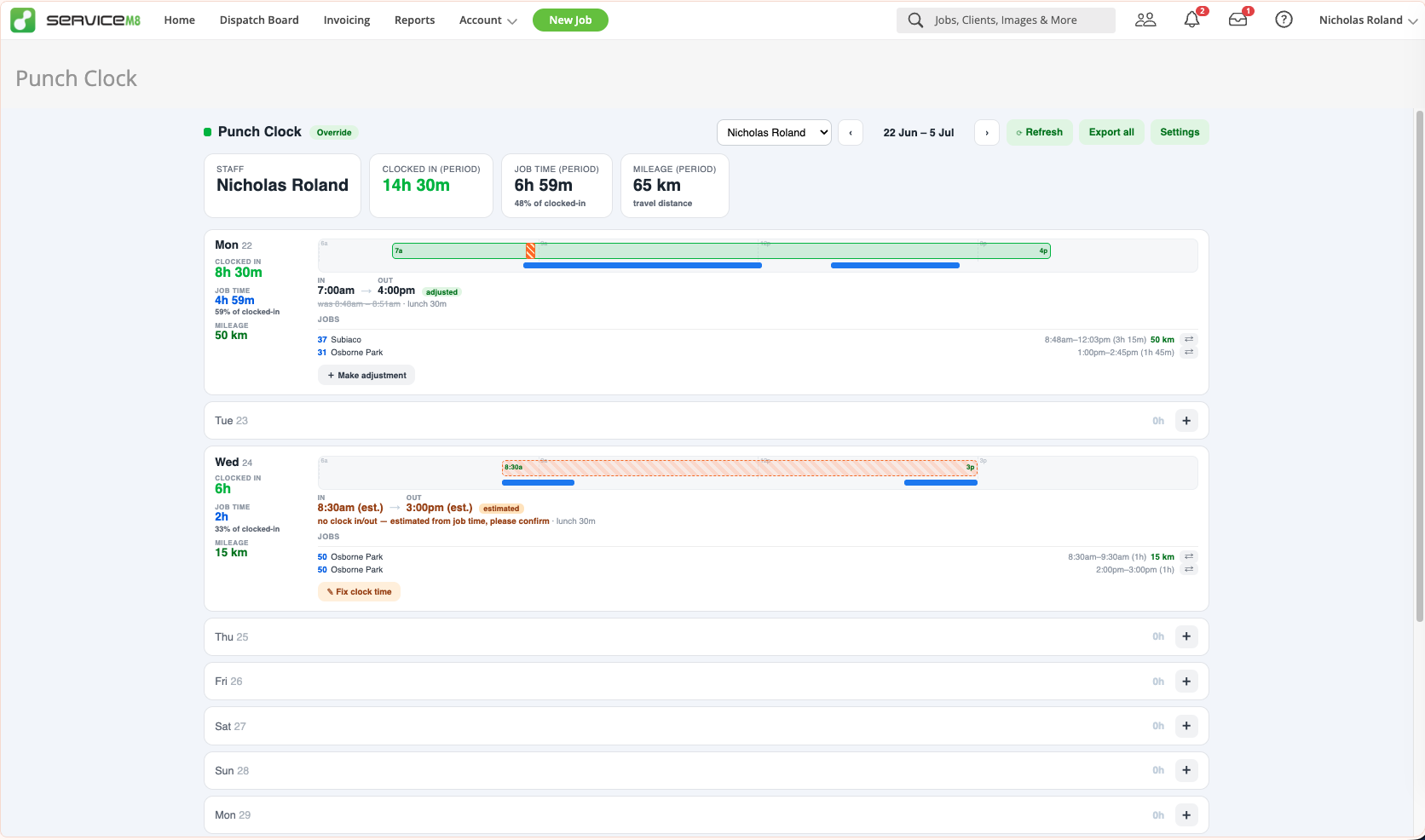
A full week built from the punches your crew already makes — shift against job time, adjustments and estimated punches flagged.
Shifts and Job Time, Side by Side
The clocked shift on one bar, the time recorded against jobs on another — so you can see at a glance where a day actually went and what share of it was on billable jobs. Daily totals down the left, period totals across the top.
- Week timeline on desktop, day view in the ServiceM8 mobile app
- Clocked-in hours, job time and the job-time percentage per day and per period
- Every job on the day listed with its start, finish and duration
- Reads the punches your team already makes — nothing new for them to learn
Adjustments, Not Arguments
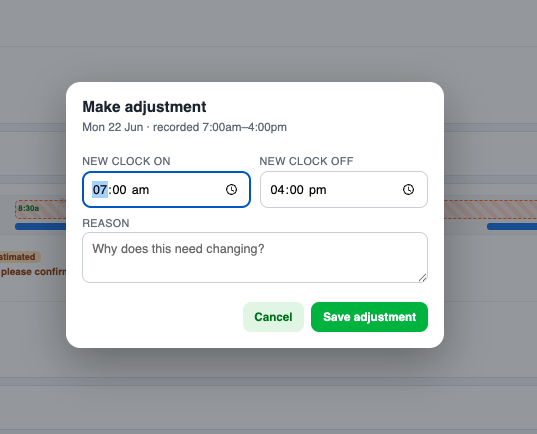
Someone forgot to clock on after smoko? They raise an adjustment with a reason; you approve or decline. The timeline strikes through the old time and shows the new one, with a full paper trail. Admins can fix a time outright.
- Staff request a correction with a written reason
- Owners and managers approve or decline — full approve/decline trail kept
- Adjusted days are badged, with the original time struck through beneath
- Admins can edit a time directly without the request step
Missing Punches Filled In
No clock off recorded? Punch Clock estimates it from the first and last job activity of the day and clearly labels it as estimated, so a forgotten punch never becomes a blank row at payroll time — with a Fix clock time prompt right there on the day.
- Estimated from the day’s first and last job activity
- Clearly badged as estimated — never passed off as a real punch
- “Please confirm” prompt so it gets reviewed before payroll
- One tap to correct it into a confirmed time
Built Around Your Pay Period
Weekly, fortnightly or monthly, anchored to the date your pay run starts. Page back through past periods any time — and because it reads live from ServiceM8, this pay period is already populated the moment you install it.
- Weekly, fortnightly or monthly pay periods
- Anchored to your actual pay run date — not a fixed calendar week
- Page back through previous periods whenever you need them
- Lunch handled properly — paid or unpaid, fixed break or auto-deducted after a set number of hours, with job time overlapping the break reconciled so totals never exceed the shift
On the Truck or at the Desk
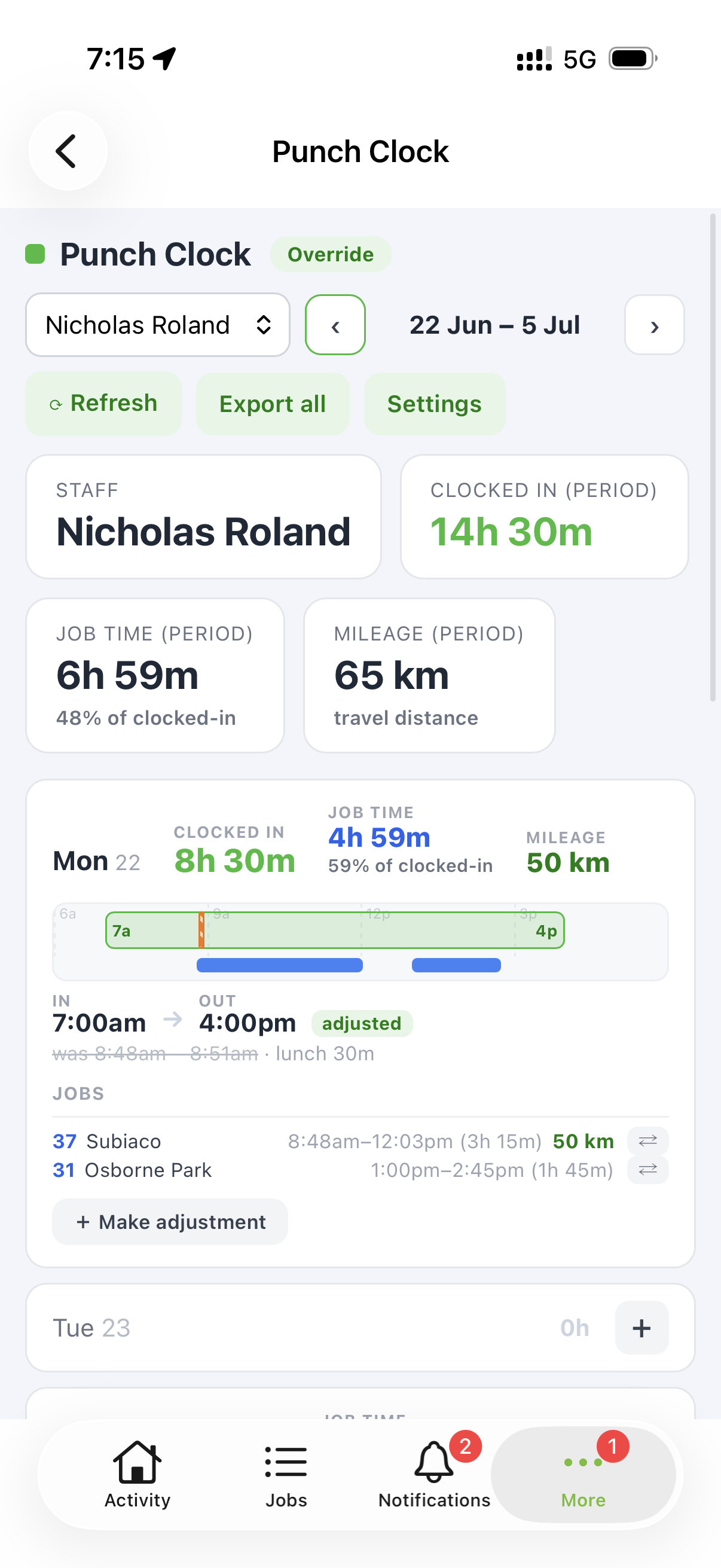
Punch Clock works on desktop and inside the ServiceM8 mobile app — the week timeline on the big screen, a day view on the phone. Technicians can check their own hours and flag the day they forgot to clock off without calling the office.
- Week timeline on desktop, day view on mobile
- Same data, same adjustments — wherever you open it
- Technicians see only their own timesheet
- Owners and managers see every staff member, change settings and approve requests
Export for Payroll
One click exports the whole pay period as a multi-sheet Excel workbook — a tab per staff member — ready to hand to your bookkeeper. No rebuilding timesheets by hand from job activity or a paper book.
- One-click Export all for the whole period
- Multi-sheet Excel workbook, one tab per staff member
- Reassign job time to the correct job before you export, straight from the timesheet
- Staff you don’t roster can be hidden entirely so they never clutter the export
Mileage & Cost from Your Forms OPTIONAL
If your team already enters kilometres or a job cost on a ServiceM8 form, Punch Clock reads the same answers per staff member and totals them alongside the hours — so travel shows up on the timesheet next to the time it took.
- Reads km / cost answers from your existing ServiceM8 forms
- Totalled per staff member, per day and per pay period
- Shows on the timeline beside the hours, and in the Excel export
- Pairs with the Formula (Travel Billing) add-on — entirely optional, Punch Clock works fine without it
No Second Database of Your Hours
Punch Clock stores no separate database of your hours. Shifts and job time are read live from ServiceM8 every time you open it; adjustments are saved as ServiceM8 staff notes. Only your settings live on Over Geek’s server.
- Hours read live from ServiceM8 — never copied into a shadow system
- Adjustments stored as ServiceM8 staff notes, so they stay with the record
- Only your settings (pay period, lunch rules, roles) live on our server
- Two-minute setup wizard confirms timezone, pay period and lunch rules — everything else has a sensible default
Try It for 7 Days, Free
Install Punch Clock and you get a 7-day free trial automatically — no credit card required up front. After the trial the subscription is $5.99 AUD/month per ServiceM8 company, billed externally by Over Geek. Manage or cancel from the add-on’s settings any time.
- 7-day free trial on every new install — no card up front
- $5.99 AUD / month per ServiceM8 company after the trial
- Billed externally from ServiceM8 via Over Geek / Stripe — no impact on your ServiceM8 plan
- Manage or cancel from Punch Clock’s settings at any time