Purchase orders for ServiceM8
Purchase orders, built into ServiceM8.
Two add-ons that raise and send POs from inside ServiceM8. Source Mini gets a professional PO out from the job in about a minute. Source runs purchasing across the business: tracking, receiving and supplier quotes.

Source Mini
The quick way to raise a purchase order from a ServiceM8 job. Pick a supplier, tick the job’s materials, and save a professional PO PDF to the job or email it to the supplier.

Source
Full purchase-order management for ServiceM8. Raise, send, track and receive POs, send quote requests to several suppliers at once and compare them side by side, and see what’s been ordered against every job.
Got a purchase order made with Source? It came from one of your customers using ServiceM8. For anything about the order itself, please contact the business that sent it.
In both add-ons
Send the order, not your prices.
If the price on your PO is higher than the rate you’ve agreed with a supplier, sending it invites them to bill you the higher number. Turn off Show prices and totals and the supplier gets the items, codes, quantities and delivery details, with no unit prices and no totals.
- One switch, on or off. Set it once in Settings and change it whenever you like.
- The PDF and the email. Prices are left out of both, so nothing slips through in the email body.
- The supplier bills from what you agreed. There’s no figure on the PO for them to match.
Source Mini · $9.99/month
Get the order out the door, straight from the job.
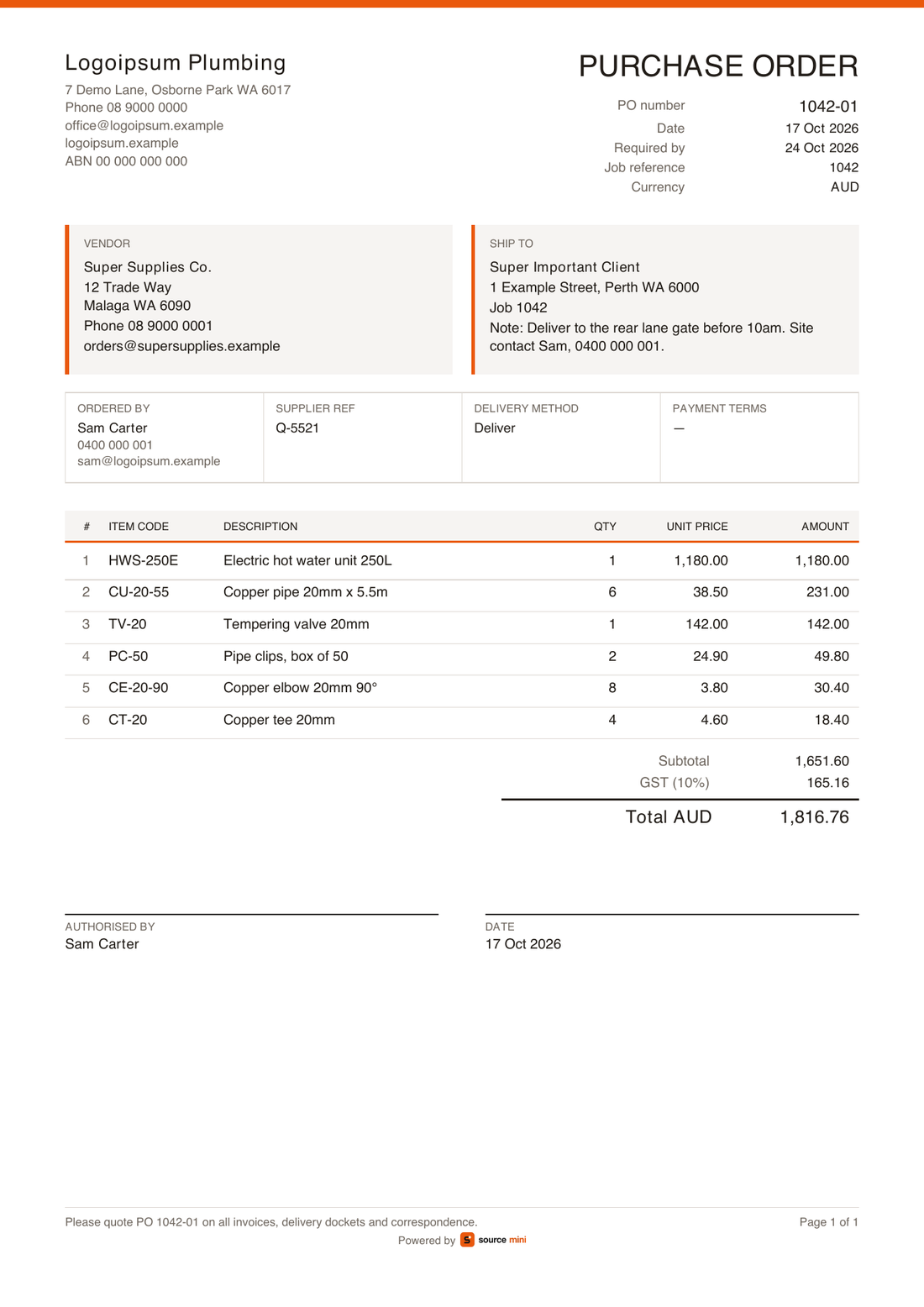
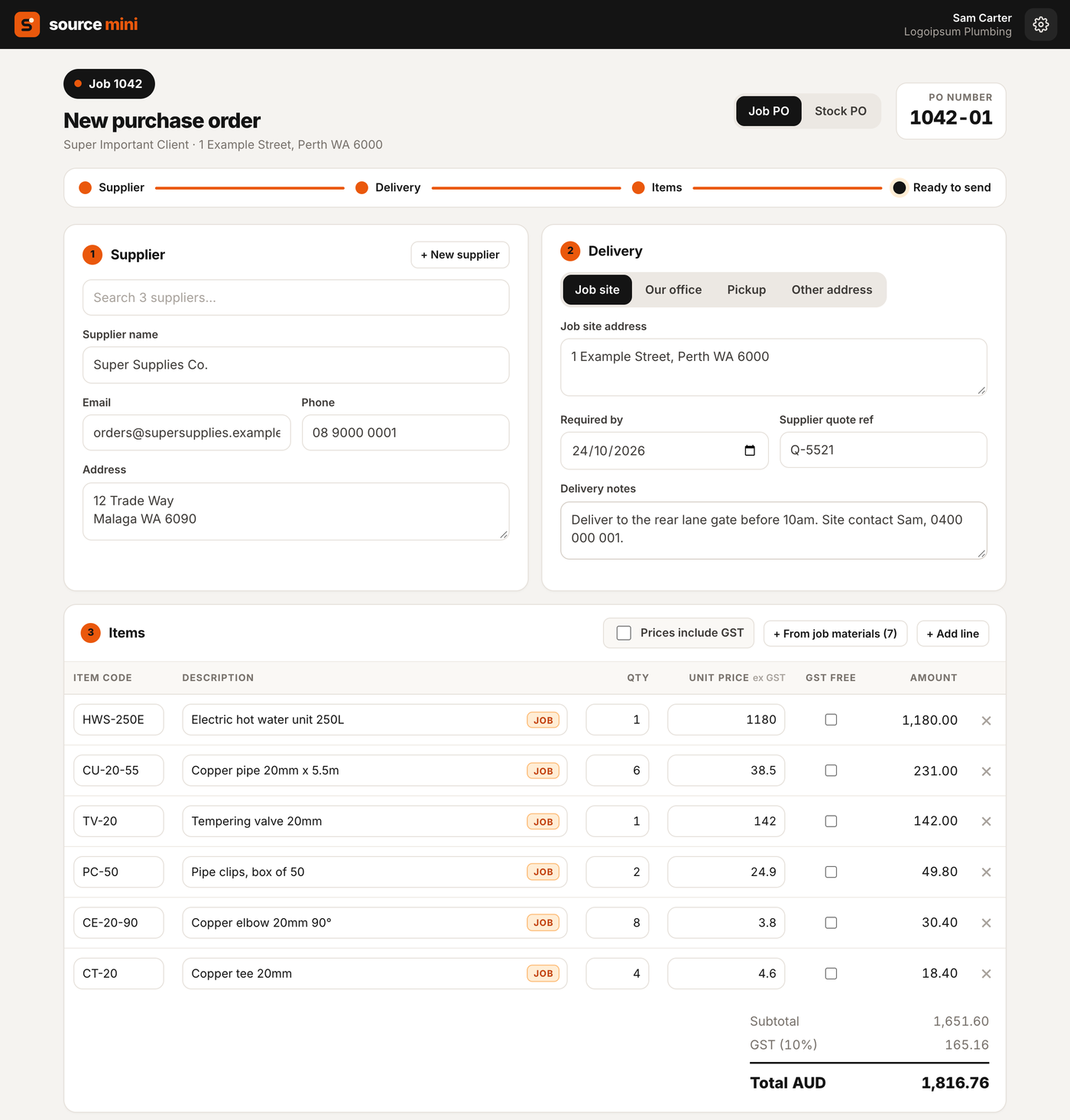
Open Purchase Order – Source Mini from the job card. Pick a supplier, tick the job’s materials, and save the PO PDF to the job or email it to the supplier, in about a minute.
- Job and stock POs. Job POs are numbered from the job (1042-01, 1042-02); stock POs get their own numbers (STK-00001).
- Your suppliers. Pick from ServiceM8’s Suppliers list, or add a new one from inside Mini and it’s saved back to ServiceM8.
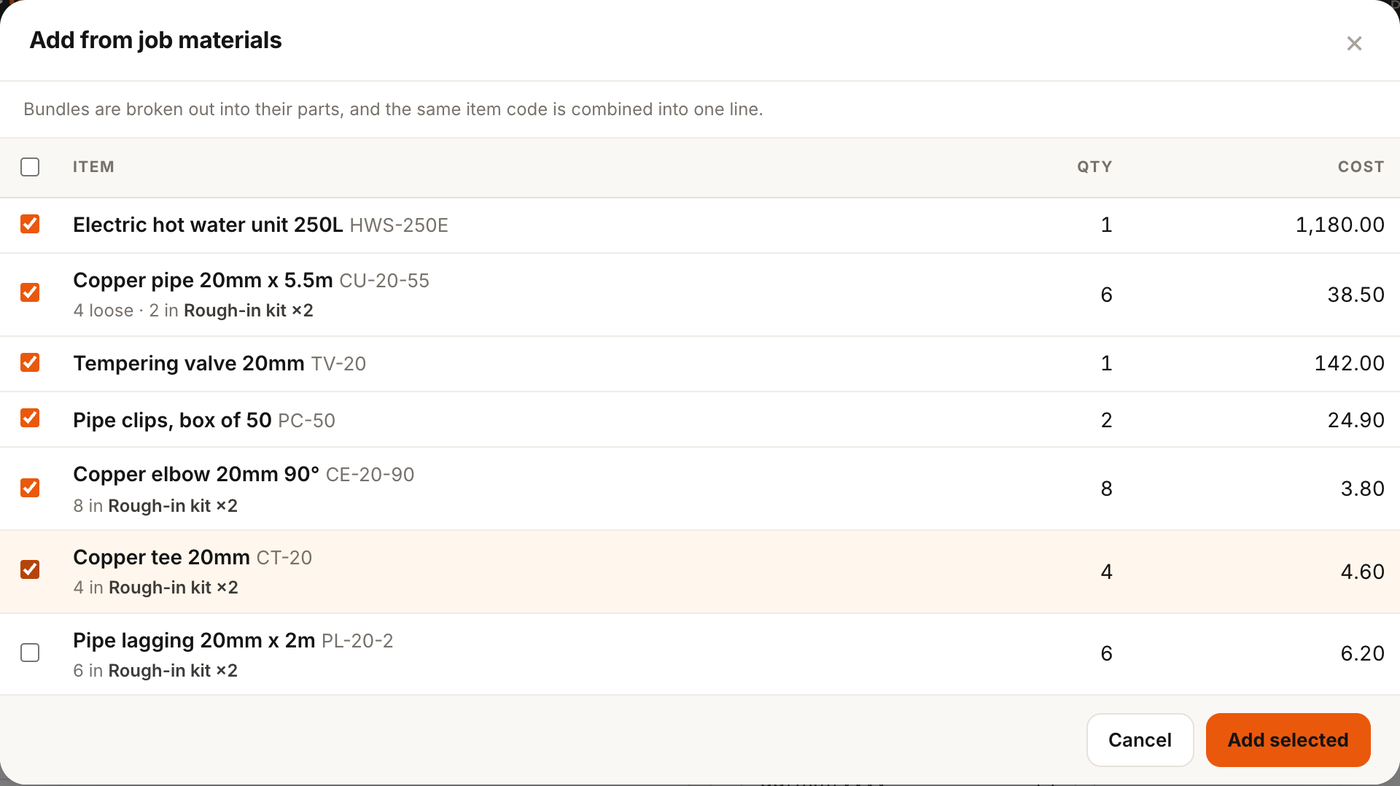
- Job materials in one click. Bundles are broken out into their items, and the same item code is merged into one line.
- Delivery details. To the job site, the office, another address or pickup, with a required-by date, the supplier’s quote reference and notes.
- Tax done right. Prices including or excluding GST, tax-free lines, and any tax name, rate and currency.
- Send it. Save to the job, or email the supplier from ServiceM8 as you, with the PDF attached and logged on the job. Preview it first.
No separate database of your POs
The PO lives in ServiceM8 as the PDF on the job, and the email is in the job’s history. Over Geek keeps only your account’s settings and who has access.
What Mini doesn’t do
No tracking of what’s been ordered or received, no list of POs across jobs, no quote requests or tool POs, and no logo on the PDF. For those, there’s Source.
Source · $24.99/month
Run purchasing across the whole business.
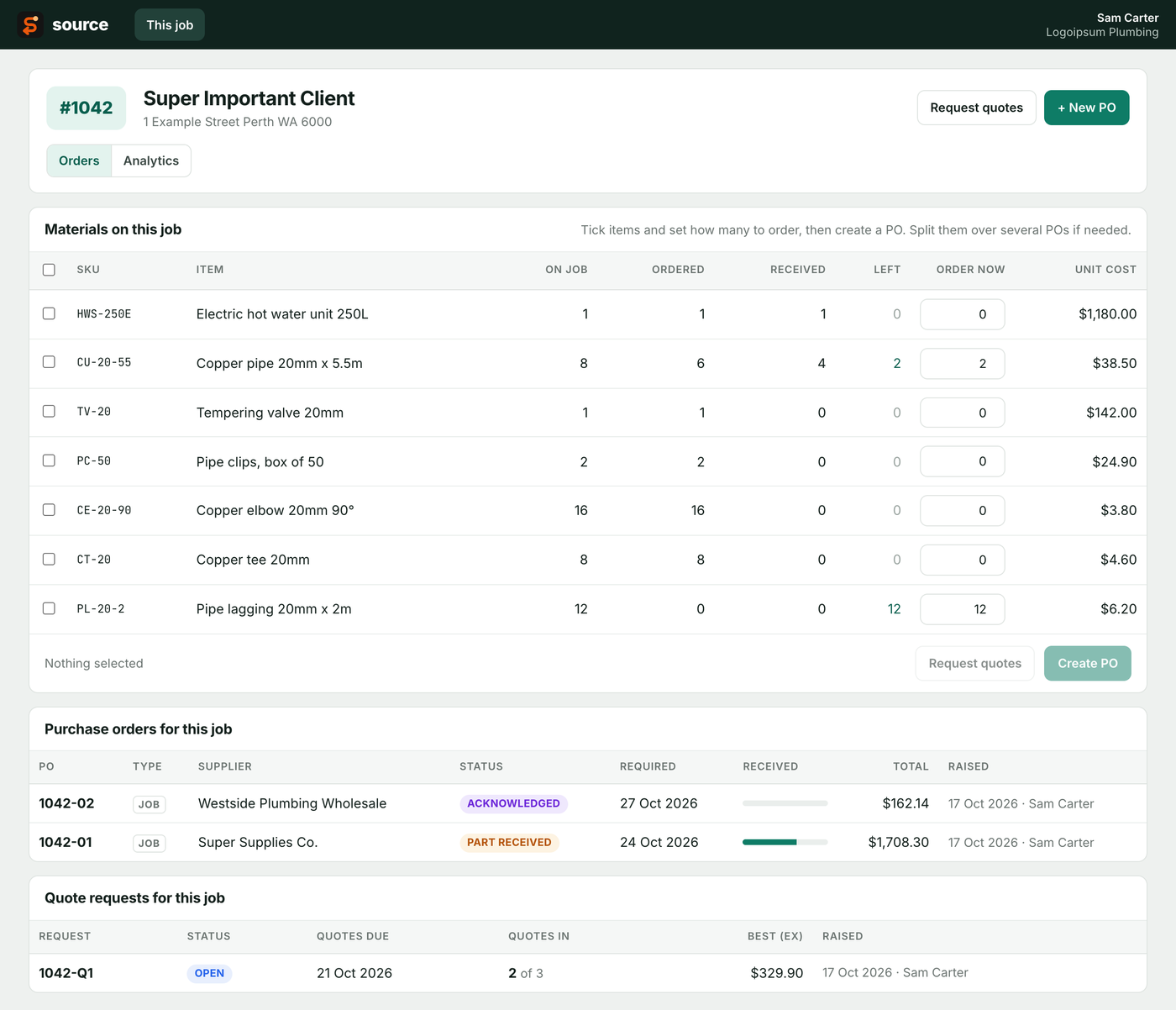
See every job material with how much has been ordered and received, then tick items to order. From the add-on menu, see all POs across all jobs, raise stock and tool POs, and manage suppliers.
Raising and sending
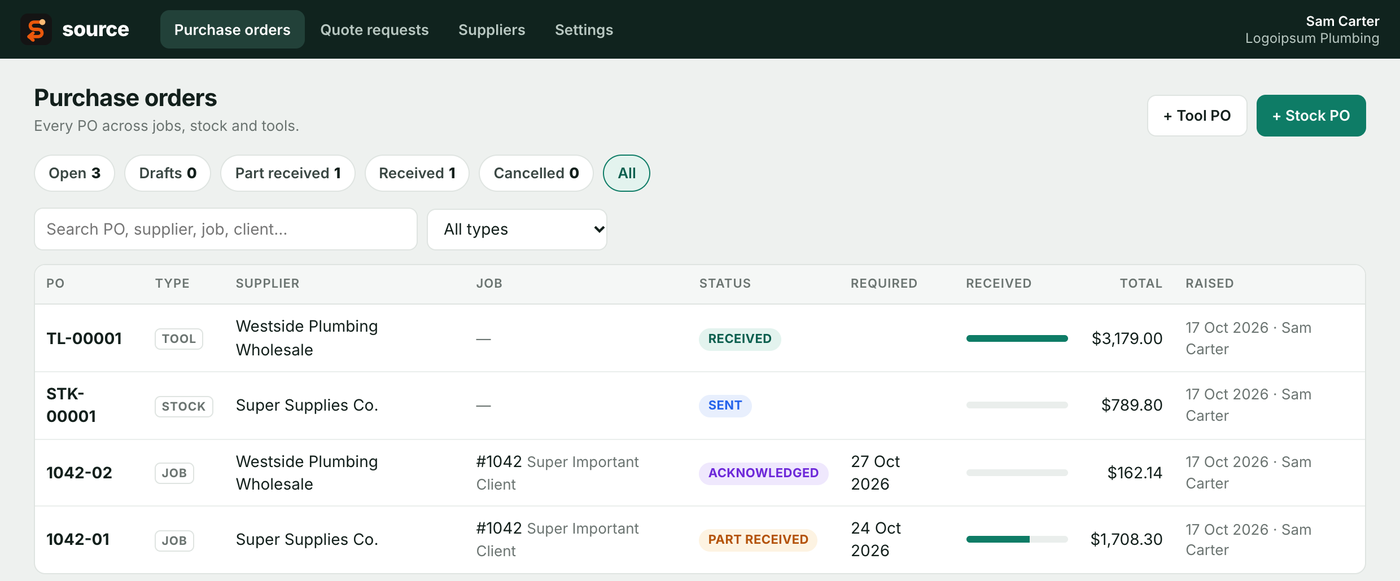
- Job POs (1042-01), stock POs (STK-00001) and tool POs (TL-00001), all with configurable formats
- Warns if a PO would order more than the job needs, or blocks it
- Your logo and brand colour on the PDF and email, with an email template and merge fields, or your own HTML
- Emailed from ServiceM8 as the staff member, with the PDF saved to the job
Tracking and receiving
- Statuses from draft through sent, acknowledged and part received to received, plus cancelled and reopen
- Receive in full or in part, with a docket number and notes
- A “Scan to receive” QR code on job PO PDFs opens the job in ServiceM8, ready to receive that PO
Quote requests
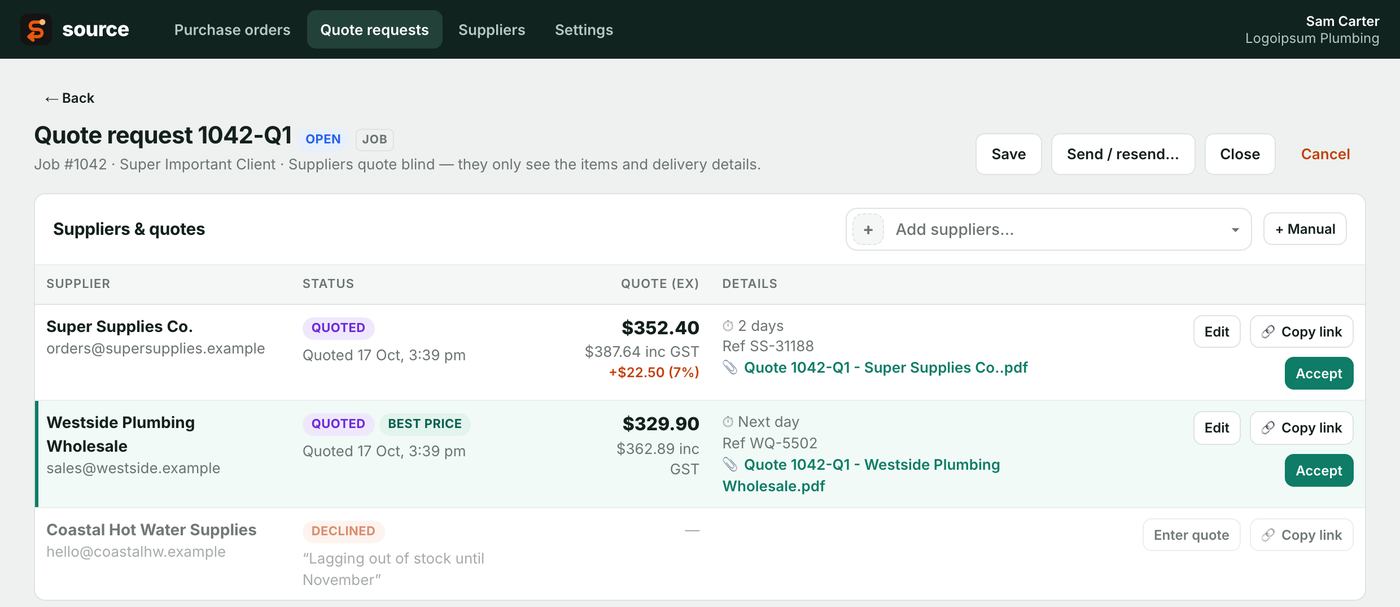
- Send a quote request for a job’s materials to several suppliers at once
- Each supplier gets a private link to enter their price and lead time and upload their quote. They never see other suppliers or your costs
- A side-by-side comparison highlights the cheapest, and one click turns it into a draft PO
- A ServiceM8 notification when a supplier replies
Reporting and admin
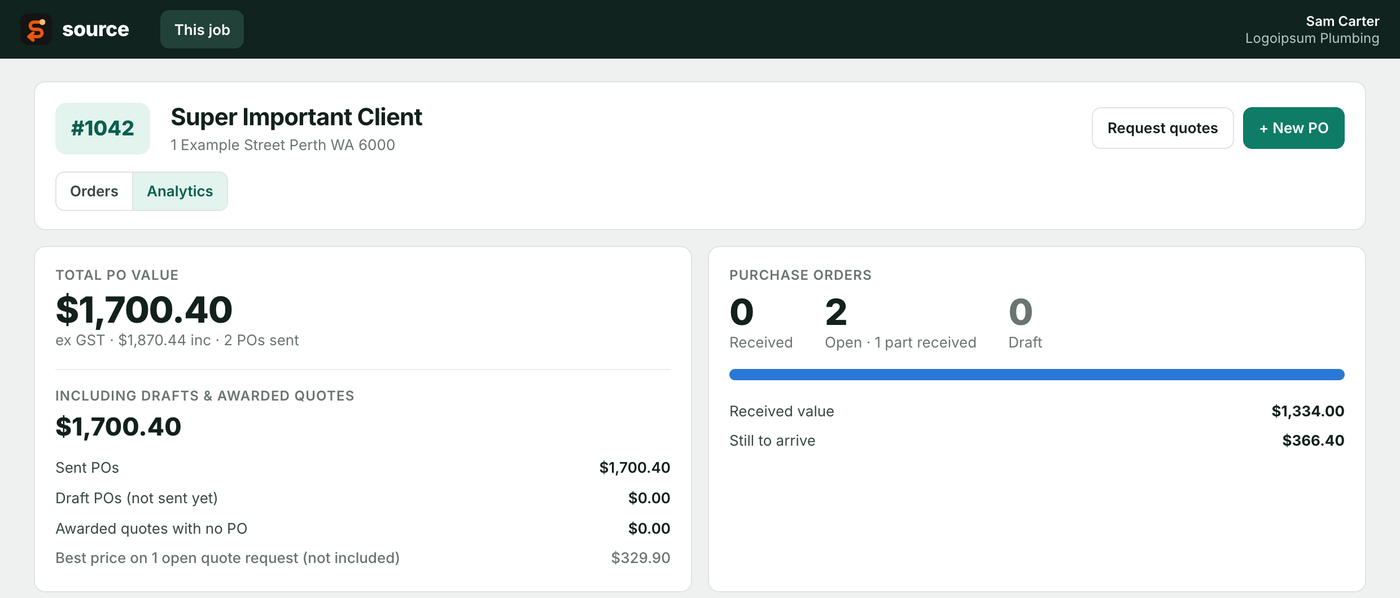
- Job analytics: ordered vs received over time, open and draft POs, and what’s still to arrive
- The same “Prices include GST” switch and tax-free lines as Mini, with your own tax name and rate
- The same admin and user roles as Mini
Compare
Which one do you need?
Start with Mini if you just need to get POs out quickly and professionally. Move to Source when you want to track orders, receive deliveries and compare quotes.
| Source Mini | Source | |
|---|---|---|
| Price | $9.99/month | $24.99/month |
| Best for | Quick POs straight from the job | Managing purchasing across the business |
| Raise POs from the job card | ||
| Add job materials (bundles broken out) | ||
| Job POs and stock POs | ||
| Tool POs | – | |
| Add new suppliers to ServiceM8 | ||
| Professional PO PDF saved to the job | ||
| Email the supplier from ServiceM8 | ||
| Prices inc/ex GST, tax-free lines | ||
| Hide prices and totals from the supplier | ||
| Works with any tax name, rate and currency | ||
| Admin and user access control | ||
| Your logo and brand colour on POs and emails | –Company details only | |
| Custom email template | – | |
| List of all POs across jobs | – | |
| Ordered vs received per job material | – | |
| Over-order warnings and blocking | – | |
| Receiving (part and full) with statuses | – | |
| Scan-to-receive QR on PDFs | – | |
| Supplier quote requests and comparison | – | |
| Job purchasing analytics | – | |
| PO data stored outside ServiceM8 | None.The PDF on the job is the record | YesIn Source’s own database |
Start with Mini. Move to Source when you need tracking.
Questions about either add-on? Email [email protected].