
AutoName
$5.99 AUD/month · 7-day free trialAutomatically rename ServiceM8 attachments using rules and templates — site, form, date, job number, you name it.
AutoName watches every photo and file added to your ServiceM8 jobs. When an attachment matches one of your rules, it’s instantly renamed using a template you control — Asset Register on a job for Williams Land becomes Williams Land - Asset Register - Jun 2026. No more clean-up, no more renaming files one by one before you send them on.
One Settings Page, Total Control
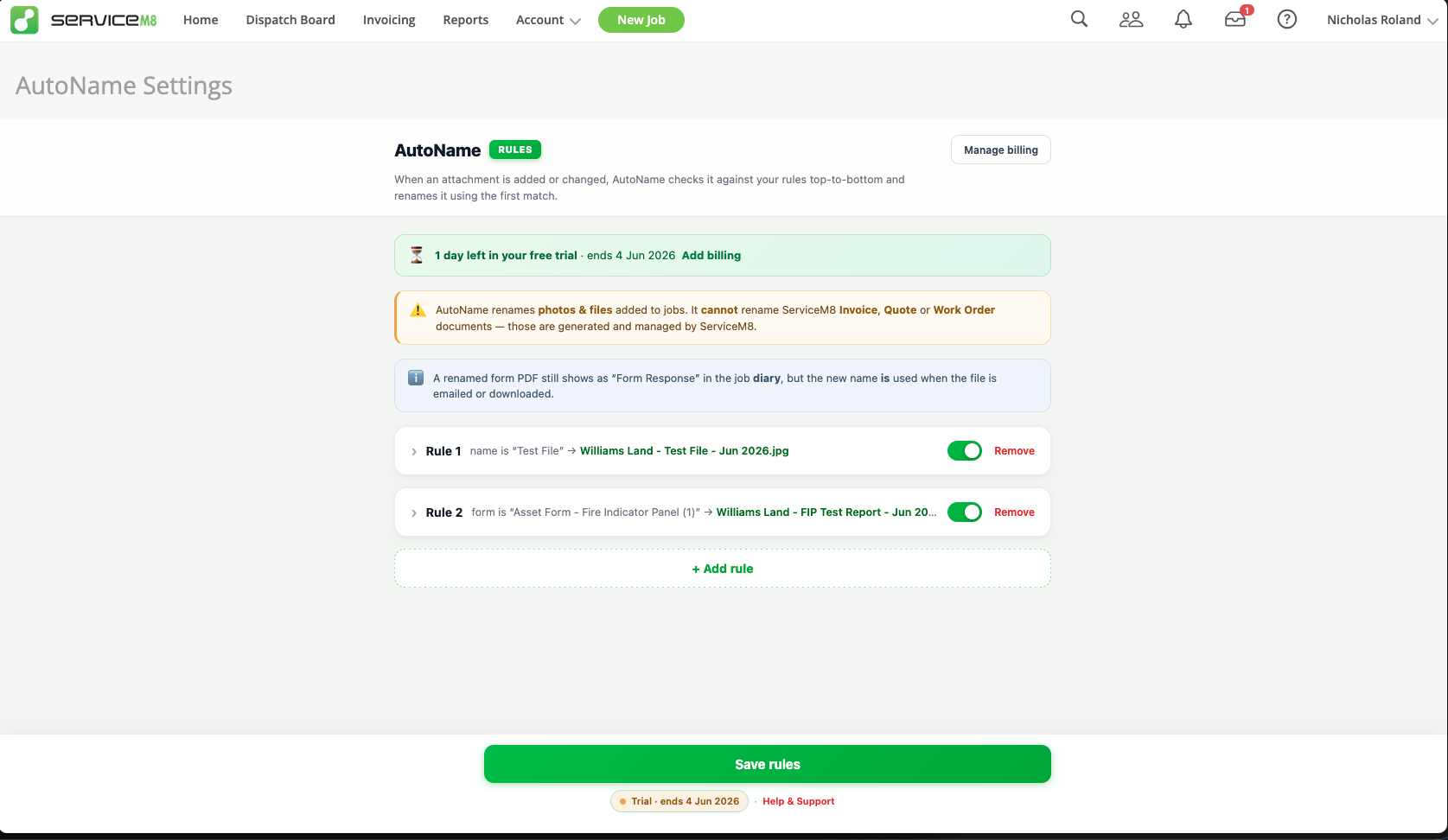
AutoName lives in your ServiceM8 Add-ons menu. Open it, write a couple of rules, save — and from that moment on, every matching attachment is renamed the instant it lands on a job.
- Runs automatically on every attachment ServiceM8 receives
- Rules are evaluated top-to-bottom — the first match wins
- Toggle individual rules on and off without deleting them
- Quote, Invoice and Work Order PDFs are left untouched — ServiceM8 owns those
Build a Rule in Seconds
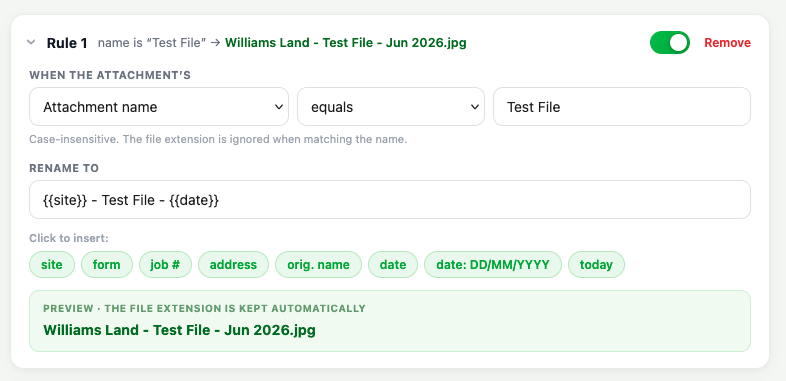
Each rule has two parts: when does it match, and what should the file be called? Pick a match (name equals, contains, starts/ends with, regex, file type, related object), drop tokens into the template, and watch the live preview update as you type.
- Match on attachment name, file type or related object
- Token chips for site, form name, job number, address, original name, date
- Live preview shows exactly what the next rename will look like
- Case-insensitive name matching, file extension ignored when matching
Real Templates, Real Names
Templates are plain text with token placeholders. Mix and match whatever your business reports need — site name, address, job number, date in any format. The original file extension is always kept automatically.
{{site}}— the job’s client / company name{{form}}— form name for form-submission PDFs{{job}}/{{address}}— job number and address{{date}}— the attachment’s timestamp, formatted however you like (YYYY,MMM YYYY,DD/MM/YYYY…){{today}}— today’s date, in the same format styles
Form PDFs & Site Walks Sorted
AutoName knows which job a form response belongs to. Match on the form name (“Fire Indicator Panel”, “Smoke Alarm Test”, anything you’ve built in ServiceM8) and every PDF that form generates lands on the job with a clean, branded filename.
- Works with form-submission PDFs, regular attachments and company-level files
- Resolves
{{site}}even when the file is on a form response, not a job - Inspection / testing / audit forms are the killer use case
- The renamed file shows up correctly in the job’s emails and downloads
Sweep Attachments — Catch Anything Missed
AutoName renames files the moment they land, but ServiceM8’s mobile app doesn’t always send us a notification — especially for photos taken in the field. When that happens, the photo attaches to the job fine, it just keeps its default name. Open the AutoName: Sweep Attachments action on the job card to tidy those up in one pass.
- One-click preview of every attachment on the job that would be renamed (old → new)
- Nothing changes until you hit Apply — safe to inspect first
- Uses the exact same rules as automatic renaming — results are identical
- Skips anything that already matches your rules — no double-renaming
- Works around a known ServiceM8 mobile-webhook quirk — not an AutoName fault, just a nice safety net
Try It for 7 Days, Free
Install AutoName and you get a 7-day free trial automatically — no credit card up front. When the trial ends, billing is handled directly through Over Geek (separate from your ServiceM8 subscription) and a Manage billing link inside the settings page takes you straight there.
- 7-day free trial on every new install
- $5.99 AUD / month after the trial
- Billed externally from ServiceM8 via Over Geek — no impact on your ServiceM8 plan
- Cancel anytime from the Manage billing page